Create a new ADF project, with a a page on adfc-config. Create new business components based off the default HR schema.
Open the new Employee view object the you have just created and add a new List of Values to the DepartmentId attribute.

Add LOV to the DepartmentId attribute
Add a new List Data Source:
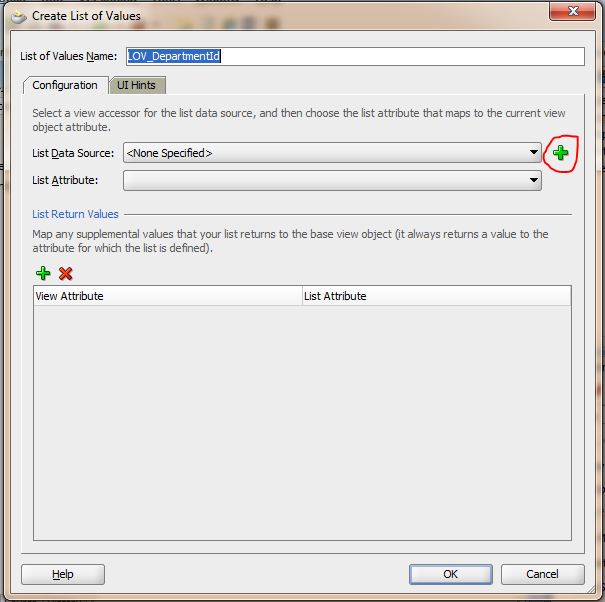
Add a new List Data Source
Add DepartmentsVO to EmployeesVO:

Add DepartmentsVO to EmployeesVO
Select the DepartmentId as the list attribute:
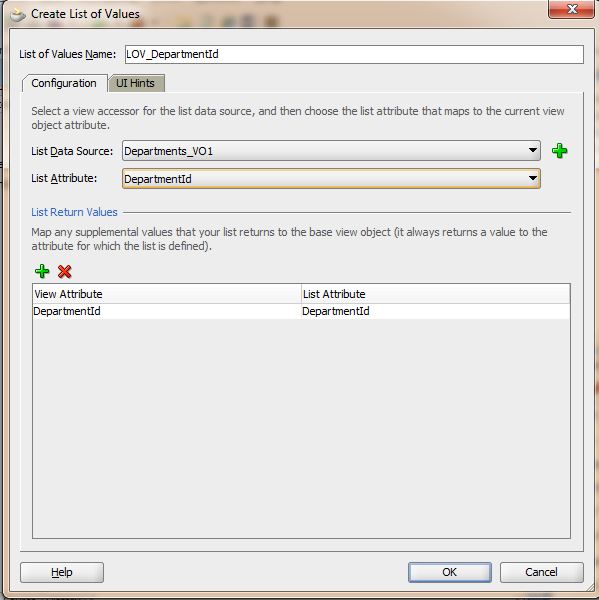
Select DepartmentId as the list attribute
Choose the DepartmentName as the UI Display Attribute hint

Select DepartmentName as the display attribute
Refresh the data controls, then drag employees table on to a page as an ADF Table

Drage Employee data control onto the page as an ADF table
Make sure that the DepartmentId attribute component to use is an “ADF Select One Choice”

DepartmentId component should be ADF Select One Choice

mon
/ 11 November 2014I have been following your example. It worked like as expected except when i change the value using the select one choice , move to the next record and go back to the edited record the value that i choose is blank instead of the new value that i selected. any tips would be highly appreciated.
thank you.